Live wedding message wall: how to show guest messages on screen
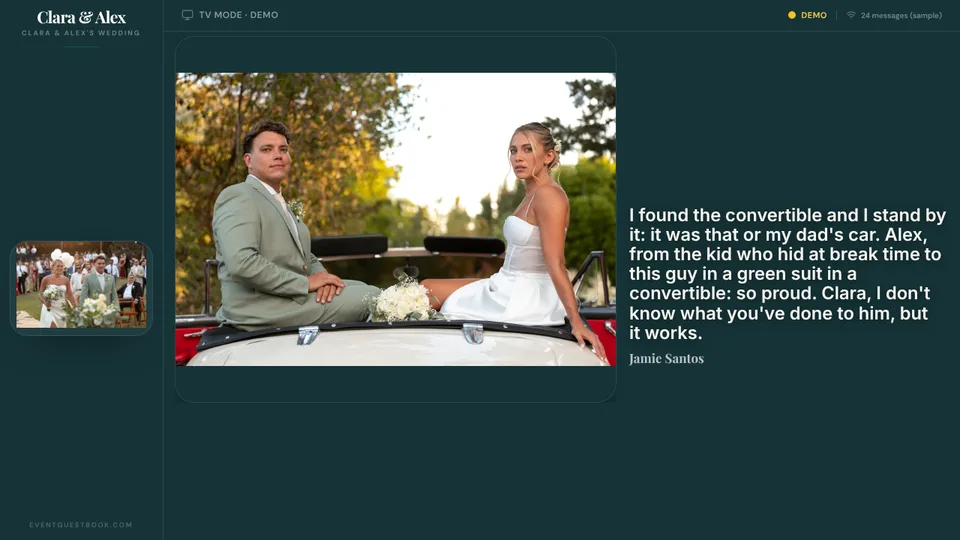
Some wedding moments are never fully planned. A table bursting out laughing when an old photo appears. Grandma reading a message on screen and saying "oh, how lovely." The shy friend who sees a note go up and decides to leave his own.
A live message wall is for exactly that: making sure your guests' words don't stay hidden until the next day. It makes them part of the atmosphere. A message comes in from a phone, appears on a screen and, suddenly, the wedding carries a little more of your story.
You don't need a big production. With a QR code, a laptop or a TV, and a clear idea of when to show it, you can create a simple touch that gets far more people involved.
What is a live message wall?
It's a screen that shows the messages and photos your guests send from their phones. It's usually part of a digital wedding guest book: guests scan a QR code, write their message and everything is saved in an online book.
The difference is timing. With a traditional book, messages are read afterwards. With a wall, they can be seen during the celebration, in real time or close to it, like a living corner of the wedding.
It works because nobody has to stand in front of a microphone. Whoever wants to write something short, writes. Whoever wants to send a photo of the toast, uploads it. Anyone who couldn't come can leave a message beforehand and be present too.
The feeling is lovely: the event carries on, and every so often a line appears that makes a whole table smile.
How the live wall works
In EventGuestBook, the live wall has a TV mode designed for showing messages on a screen during the event. The idea is simple:
- You create your guest book.
- You share the QR code or the link with your guests.
- They leave messages from their phone's browser.
- You open the wall on a screen, TV or projector.
- Messages appear in a clean design that accompanies the celebration.
No apps for guests. No accounts. No asking your uncle to sign up between the salad and the main course. Scan, write, send.
For the wider picture of how the book, the QR code and the wall fit together, see how it works.
The best moments to show it
A live wall works best when it accompanies the day, not when it interrupts it. Think of it as soft background light, not a show that forces everyone to look at once.
During cocktail hour
This is one of the most natural moments. Guests are standing, greeting each other, with their phones close by and the energy of arriving. A sign with the QR code and a screen near the welcome area can spark the first messages.
Cocktail hour also has small gaps. While someone waits for a drink, they can scan the code and leave a simple line.
During dinner
Here it pays to be more deliberate. Show the wall at specific moments: between courses, before the speeches or while a surprise is being set up. If the room has screens, it blends in well.
A line from the DJ or the wedding planner helps a lot: "We'll be showing some of your messages during dinner. The QR code is on your table if you'd like to leave yours."
During the party
Once the dancing starts, the wall gets more spontaneous. Photos, affectionate jokes, group messages and less formal memories show up. It's fun, but moderation matters more here to keep the tone right.
The day after
You can also leave the link open afterwards. Many people write better once they're relaxed, with Sunday coffee and a phone full of photos. It's a nice way to make the wedding last a little longer.
Where to put the QR code so people take part
The wall starts long before the screen. It starts with how you invite people to sign.
These spots tend to work:
- On the welcome table.
- On the seating chart.
- On a small card at each table.
- Near the photo backdrop.
- In the guests' group chat.
- Next to the screen where the wall will be shown.
You don't need to fill the venue with codes. It's enough for the code to be where people already look. Above all, give it a human line: "Leave us a message and see it on the wall" works better than "Scan this code."
For a practical foundation, the guide to a QR code wedding guest book explains how to combine the code, the link and the online book.
Moderation: the invisible peace of mind
Most messages will be lovely. But a wedding has emotion, drinks, inside jokes and cousins who get a little too comfortable. That's why it helps for the wall to have some control.
Moderation isn't there to kill spontaneity. It's there to protect the moment. As the host, you can keep an eye on what comes in and hide anything too private or off-tone.
It also helps to set the tone from the start. If the sign says "Leave the couple a happy memory," people understand this isn't just another group chat.
What you need to show it
You don't need a production crew. For most weddings this is enough:
- A laptop, tablet or phone with a browser.
- A TV, screen or projector.
- A stable connection, if possible.
- An HDMI cable or screen mirroring.
- The QR code visible to guests.
- A test before the event starts.
Run a simple test: open the wall, send a sample message and check that it reads well from a distance. If the room is bright, turn up the brightness. If the projector is far away, choose a large screen and avoid small type.
The technology should disappear. What people should see is the messages.
Lines to invite guests to take part
The wording on the sign matters more than it seems. If it sounds cold, people ignore it. If it sounds warm, they scan.
You can use lines like:
- "Leave us a message and we'll see it on the wall."
- "Scan the QR code and sign our digital guest book."
- "Tell us a memory, a wish or a kind joke."
- "Your words are part of this wedding too."
- "Sign from your phone. Nothing to download."
And so guests don't freeze up, you can share these wedding guest book messages from guests or these wedding guest book quotes.
The wall and the book: better together
The wall moves people during the wedding, but the online book is what stays afterwards. That combination is the best part: what appears on screen is also saved to be read calmly later.
During the event you may only catch part of it. The next day you can open the book and find messages from people who signed at the table, from home or after getting back to the hotel. That's where the whole keepsake lives.
If you're deciding what fits best, take a look at plans and pricing and create a free Demo first to try it with no pressure. The live wall is included in every plan.
Frequently asked questions
What is a live message wall?
It's a screen that shows messages and photos sent by guests from their phones, usually through a digital guest book with a QR code.
Do I need a professional projector?
Not necessarily. It can run on a TV, a laptop connected by HDMI or the venue's projector. What matters is testing it beforehand.
Do guests have to download an app?
No. With EventGuestBook they open it in their phone's browser by scanning a QR code or tapping a link.
When is the best time to show the messages?
It works very well during cocktail hour, between courses, before the speeches or during the party. Natural moments are best, without interrupting.
Can messages be moderated?
Yes. The host can hide messages to keep the tone of the wedding and avoid anything too private or out of place.
Are the messages saved too?
Yes. Besides appearing on screen, they're kept in the digital guest book for you to read afterwards.
Can guests who aren't at the wedding take part?
Yes. Send them the link so they can leave their message from home.
Set up your live wall
If you want your guests not only to sign but to be part of the atmosphere, prepare your live wall ahead of time, test the screen and keep the QR code visible.
Start simple. A kind message, an unexpected photo, a note from someone who couldn't come. Sometimes that's enough to make a wedding feel even more like yours.
Related articles
Digital guest books for wedding planners: how to offer one to your couples
An extra that adds no logistics to the wedding day if you plan it well: who creates it, when to set it up, how to show it on a screen and which plan suits each couple.
7 min
Messages, photos and voice notes: what your wedding keepsake looks like when guests give all three
A message tells you what someone thinks, a photo shows how it felt and a voice note gives you their voice back. Here is how your wedding keepsake changes when guests leave all three.
8 min
How to get guests to sign your wedding guest book
Participation is a matter of friction and timing, not nagging. What actually moves the needle before, during and after the wedding.
8 min