A QR code for your wedding photos: how it works and what it costs
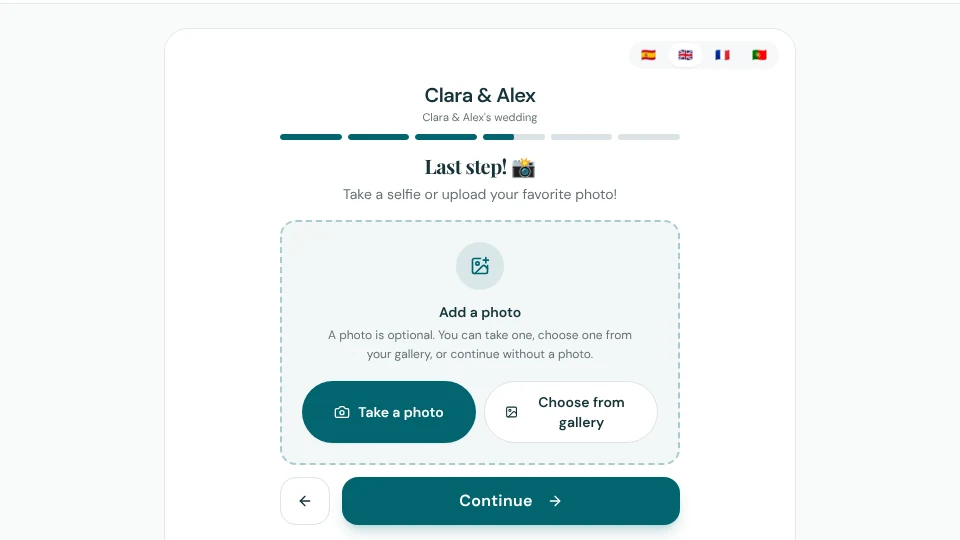
You went to a wedding, there was a little sign with a QR code on the table, you scanned it and uploaded your photo in ten seconds. And you thought: I want that at mine.
It's easier and cheaper than it looks. Here's exactly how a QR code for wedding photos works, what you need and what it costs.
What the QR code really is (and what it isn't)
The QR code is a door. Scan it with a phone camera and it opens a link. It doesn't store photos inside those little squares, and it doesn't create a gallery on its own. It takes your guests to the place where they can take part.
That's why you can generate a QR code for free and still not have solved the problem. You need to decide what's on the other side:
- A shared folder.
- A photo album.
- An upload form.
- A digital guest book where each picture comes with a message.
The last option is especially nice for a wedding, because you don't receive a hundred files with no context. You receive the photo of your cousin's table and, next to it, "We had just found out the waiter grew up in the same town as Grandpa." That sentence changes the picture.
With EventGuestBook, the QR code leads to your event's page. The guest opens it in their browser, writes a message and can add a photo if you've turned the option on. The platform optimizes the image during upload.
How it works, step by step
You don't need to design a website. The path looks like this:
1. Create your event
Add the names, the date and the basics. You can personalize the cover and decide how you want the book to look.
2. Get the link and the QR code
Both point to the same place. The code is for printed signs. The link is handy for sending before or after the wedding.
3. Test it as a guest
This step gets skipped far too often. Open the QR code on a phone that isn't signed in to your account. Better yet: hand it to your dad, your aunt or that friend who always hits "back" at the decisive moment.
Check three things: that the code scans easily, that the page loads and that it's obvious where to add the photo. If you find yourself explaining the steps over someone's shoulder, adjust the sign or the instruction.
4. Print and place the signs
One card per table is usually enough. Add another in a calm, well-trafficked spot and, if you like, one next to the photo backdrop. The places that work best are covered below.
5. Guests take part
They scan, write and pick a picture from their phone. They don't join a shared group and nobody sees their phone number. You can review the entries afterwards and hide anything you'd rather not show.
6. Keep the result
With Pro you get the online book, the book as a PDF and all the photos in a ZIP file. The photo download is available for a limited time after the event (currently 90 days), so it's worth a reminder on your calendar.
What your guests need
Very little:
- A phone with a camera.
- An internet connection.
- A browser.
- A photo they want to share.
They don't need to install an app, create an account or remember a password. It doesn't matter whether they use an iPhone or an Android phone.
What about older guests? If they can open the camera to take a picture, they can usually point it at a QR code. The key is for the sign to say what will happen: "Scan to leave us a photo and a message." A bare square with no text could be the menu, the Wi-Fi password or anything else.
It's worth offering the direct link to anyone who can't get the code to scan. Send it to them privately or ask someone at their table to help. Accessible doesn't mean foolproof. It means having a short path and a simple alternative.
Where to put the QR code on the wedding day
The best spot isn't the prettiest one. It's where people pause, have light and can take out their phone without interrupting anything.
On every table
This is my favorite. Everyone ends up sitting down, and the card starts conversations. Make it stable, avoid glare on the code and don't hide it behind the centerpiece.
On the seating chart
It gets a huge amount of attention, though people usually read it in a hurry. Use it to introduce the idea and repeat it somewhere guests can take part calmly.
Next to the photo backdrop
Guests already have a fresh photo and their phone in hand. The link between "take the picture" and "share it here" explains itself.
At the bar
It works during the party, especially once the photographer's coverage has ended. Pick a well-lit spot where lines don't form.
On a screen
If you open the live wall to show messages, put the QR code next to it. The live wall is included in every plan, the free Demo too. Test the connection, the browser and the cables beforehand. The wedding is not the moment to find out the laptop wants to install updates.
I'd avoid making it a big feature at the ceremony. There you want guests to put their phones away and let the photographer work. The QR code belongs to cocktail hour, the tables and the party.
There's more detail in this guide to QR codes on wedding tables.
What to write next to the QR code
"Scan here" explains the gesture, but not the reason. Give people a reason.
These lines tend to work:
- "Show us the wedding from where you're sitting."
- "Upload a photo you think we haven't seen."
- "Leave us a photo and tell us what was going on."
- "Your table's best photo lives here."
- "Scan, write and share a memory."
For more participation, add a different challenge at each table. And if you're designing the sign yourself, borrow ideas from these wedding QR code sign ideas.
What it really costs
The QR square itself can be generated for free. What you pay for is the service that receives and organizes what your guests send, and lets you keep it.
With EventGuestBook you can start with a free Demo. It includes up to 5 messages and lets you add up to 5 photos of your own per event. You can also try photos in messages, voice notes if you turn them on, and the live wall. It's a real demo for testing the experience, not a plan meant for a whole wedding of a hundred people.
Pro costs €49.95 per event, paid once. It includes unlimited messages and photos, the photo ZIP, the PDF book and the online book. If you want to edit the book in PowerPoint or Canva, Premium (€99.95) adds an editable PPTX file you can import into Canva (not a native Canva project), page reordering and the option to remove the EventGuestBook watermark.
The current details are on the plans and pricing page.
Add the cost of printing the signs to your budget. If you work them into the menu cards or print them at home, the cost can be minimal. If you order cards on special paper with rounded corners and stands, it depends on the stationer. The QR code works exactly the same on luxury card stock as on a plain card. There you're paying for looks, not technology.
QR code vs. photo booth
They don't play quite the same role.
A photo booth creates an activity: a backdrop, props, poses and prints on the spot. A QR code collects the photos your guests are already taking all over the event. You can have both if you love them, but they aren't exact substitutes.
Photo booth rentals are usually priced by the hour, and a few hours commonly runs from several hundred dollars to more than a thousand. The price moves with the city, the duration, the attendant, travel, prints and props.
The photo booth wins if you want entertainment and physical prints during the party. The QR code wins on coverage: it can take in a photo from the entrance, one from every table, the bar and the morning after. And it takes up as much room as a card.
My take: if the budget allows and your people love to pose, a photo booth is great fun. If your priority is rescuing the views scattered all over the wedding, start by organizing how you collect them.
QR code vs. disposable cameras
Disposable cameras have undeniable charm. You can't check the picture, and each shot gets a little more thought. They also bring costs and surprises.
A 27-exposure single-use camera tends to cost somewhere around $15 to $25. Ten tables put you in the neighborhood of $200 before developing, prints or scans.
You also have to hand them out, collect them and take them to be developed. Some photos will come out dark or blurry, and you won't know during the wedding. That's part of the charm, and also part of the budget.
The QR code uses the cameras your guests already carry. They see the photo before uploading it, and it arrives with a few words attached. In exchange, it doesn't give you the analog look or the physical object.
If you're in love with film, put two or three cameras on specific tables instead of one per table. And use the QR code for the rest. Weddings don't require swearing loyalty to a single format.
How to start for free without printing anything yet
Run a test at home:
- Create your event for free.
- Open the QR code on your phone.
- Send the link to two relatives with different phones.
- Ask each of them for a photo and a message, with no further instructions.
- Look at how it turns out.
If both arrive, design the sign. If someone gets stuck, you've found the problem in time.
That's exactly what the Demo is for. Once you know you want to use it with all your guests, compare what you need on the pricing page. Don't buy out of fear that it's complicated. Try it and decide with the phone in your hand.
Frequently asked questions
Can I create a QR code for my wedding for free?
Yes. You can create a free Demo on EventGuestBook, test the access and receive up to 5 messages. It also lets you add up to 5 photos of your own per event.
Do guests have to install an app?
No. They scan the code and take part from their phone's browser, without creating an account.
How many QR codes do I need?
The code can be the same on every sign. One card per table plus one more visible reminder is usually enough.
What happens to the photos when they're uploaded?
The platform optimizes them. The service is designed to gather them and present them alongside the messages, not to store unprocessed original files.
Can I show the photos and messages on a screen?
Yes. The live wall works on a TV or projector and is included in every plan. Test it before the event and hide any entry you don't want shown.
How much does Pro cost?
€49.95 per event. It's a single payment, not a subscription.
Which downloads need a paid plan?
The photo ZIP and the PDF book are part of Pro, and so is the complete online book (Demo only shows it with its 5 messages). The editable PPTX for PowerPoint or Canva is in Premium. The photo download is available for a limited time after the event (currently 90 days).
Can I also send the link by text or group chat?
Yes. The QR code is ideal during the wedding, and the link is for anyone taking part from home or uploading their photo the next day.
One small square, one less thing to do
Technology should disappear the moment it works. Your guest scans, shares and goes back to the conversation. You don't chase anyone or sort through five different group chats when you get back from the honeymoon.
If you'd like to see it before deciding, create your event for free. Try the QR code with the least tech-savvy person in your family. That's the demo that really counts.
Related articles

Digital guest books for wedding planners: how to offer one to your couples
An extra that adds no logistics to the wedding day if you plan it well: who creates it, when to set it up, how to show it on a screen and which plan suits each couple.
7 min
Messages, photos and voice notes: what your wedding keepsake looks like when guests give all three
A message tells you what someone thinks, a photo shows how it felt and a voice note gives you their voice back. Here is how your wedding keepsake changes when guests leave all three.
8 min
How to get guests to sign your wedding guest book
Participation is a matter of friction and timing, not nagging. What actually moves the needle before, during and after the wedding.
8 min